Sep 12, 2026Buying Guides
8K HDMI Cable Buying Guide: What You Really Need to Know
8K, 48Gbps, HDMI 2.1, Ultra High Speed — the labels pile up fast. Learn what actually matters: resolution, refresh rate, bandwidth, certification, length and cable design.
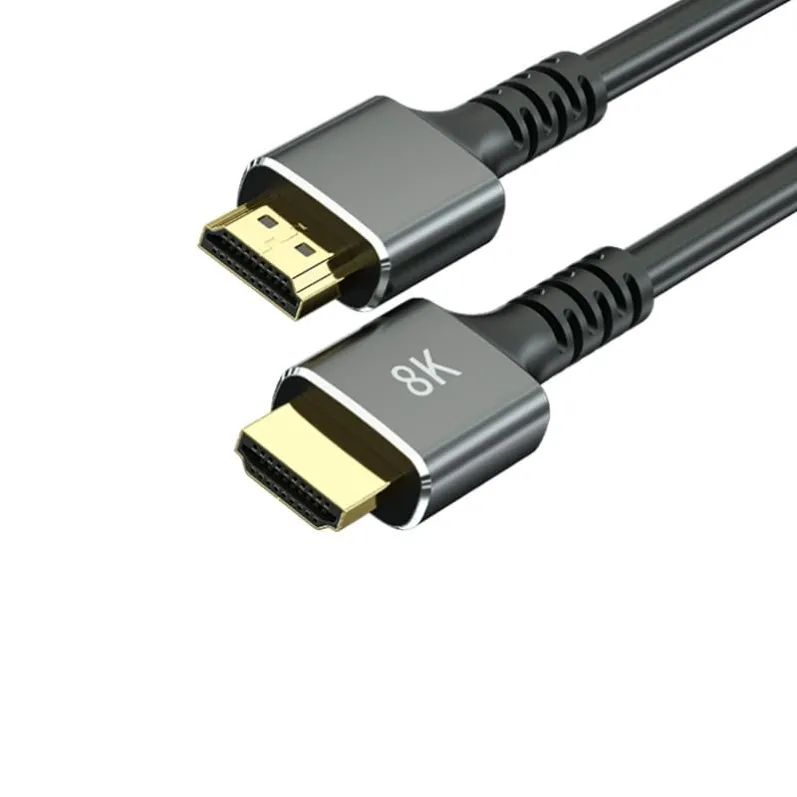
Buying an HDMI cable used to be simple: choose the right connector and plug it in.
With 4K, 8K, HDR, high refresh rates and gaming consoles, things have become a little more complicated. You may see cables described as "8K HDMI", "HDMI 2.1", "48Gbps", "Ultra High Speed" or even "8K 60Hz". These terms are related, but they are not exactly the same thing. So what should you actually look for when buying an 8K HDMI cable?
Start With the Display You Want to Run
The first question is not "Which HDMI cable should I buy?" It is: what resolution and refresh rate do I need?
Common targets include 4K at 60Hz, 4K at 120Hz and 8K at 60Hz. Higher resolution and higher refresh rates require more bandwidth.
If your TV or monitor only runs 4K at 60Hz, buying an 8K cable may not make a visible difference today. But if you are using a modern gaming console, a high-end PC, an 8K TV or a high-refresh-rate display, choosing a cable with enough bandwidth becomes much more important.
What Does 48Gbps Mean?
Bandwidth is one of the most important specifications for an 8K HDMI cable. The Ultra High Speed HDMI Cable category supports systems requiring up to 48Gbps of bandwidth and is designed for demanding applications including 8K at 60Hz and 4K at 120Hz.
This is why you will often see "48Gbps" printed on cables marketed for 8K and HDMI 2.1 applications.
But there is an important distinction: a cable advertised as "48Gbps" does not automatically prove that it has passed official certification. If certification matters for your application, look for the official Ultra High Speed HDMI Cable certification label and verify it.
Do Not Rely Only on "8K" Printed on the Package
"8K" has become a common marketing term. Unfortunately, simply printing "8K" on a package does not tell you how the cable was tested.
The official Ultra High Speed HDMI Cable certification program requires cables to be tested at an HDMI Forum Authorized Test Center. Each length of each model line must be tested, and certified products carry the required certification label.
For buyers, this provides a much better way to distinguish a tested cable from one that simply uses attractive specifications on the packaging. If you are purchasing HDMI cables for a retail product line, certification and traceability are particularly important.
Cable Length Matters
HDMI performance becomes more challenging as cable length increases. A short 1-meter or 2-meter passive cable is a very different product from a 10-meter, 15-meter or 20-meter cable.
As the cable gets longer, signal loss and other electrical challenges become more significant. For longer runs, active HDMI cables or HDMI optical fiber cables are often the better solution.
This matters for home theater installations, meeting rooms, digital signage, conference rooms, commercial displays, projectors and long-distance 8K installations. The right cable design depends not only on the target resolution but also on the distance.
Copper or Fiber?
For short HDMI connections, a well-designed copper cable is often the simplest choice.
For longer distances, optical fiber offers real advantages: fiber HDMI cables convert the electrical signal into optical transmission inside the cable, allowing high-bandwidth signals to travel much farther than conventional passive copper solutions.
When selecting a fiber HDMI cable, check the maximum supported resolution, refresh rate, bandwidth, cable direction, connector design, power requirements and compatibility with your source and display. One detail is often overlooked: some optical HDMI cables are directional — the source and display ends cannot be reversed.
Not Every 8K Setup Is the Same
Two systems can both be described as "8K", but the actual requirements can be very different. An 8K display may run at different refresh rates, with different color formats, HDR settings, color depths and compression methods.
That is why it is better to select an HDMI cable based on the complete signal requirement rather than the word "8K" alone. For demanding applications, confirm the source device, display and cable as one complete system.
Do Not Forget Gaming Features
Gamers often need more than just resolution. Modern HDMI applications can involve 4K at 120Hz, Variable Refresh Rate, HDR, eARC and high frame rates.
The official Ultra High Speed HDMI Cable category was designed for demanding HDMI 2.1 applications, including 8K at 60Hz and 4K at 120Hz. If you are buying a cable for a gaming setup, check the complete feature set instead of choosing only by resolution.
A Quick 8K HDMI Cable Checklist
Before buying, check the resolution (8K if required), the refresh rate (60Hz, 120Hz and up), the bandwidth (48Gbps for Ultra High Speed applications) and the certification label if your market requires it.
Check the length against the actual installation, the construction (copper or optical fiber) and the cable direction if you choose a fiber design.
And for gaming, confirm the features that matter to you: VRR, HDR and 4K at 120Hz.
Final Thoughts
An 8K HDMI cable is not simply "a cable with 8K printed on the box".
For reliable high-bandwidth video, look at the required resolution, refresh rate, bandwidth, cable length and certification. For short connections, a properly designed copper cable is a practical choice. For longer high-bandwidth installations, active or optical HDMI solutions provide a more reliable path.
At Mattzon, we build HDMI cables for both consumer and professional applications — including 8K HDMI 2.1 cables and long-distance fiber optic designs that carry full 48Gbps-class bandwidth over distance. Contact our team and we will help you match the right cable to your installation.