Sep 23, 2026Buying Guides
What Is a KVM Switch? A Practical Buyer's Guide
Two computers, one monitor, one keyboard. A KVM switch removes the shuffle between machines — here is what to check before you stock one.
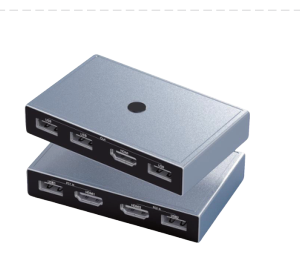
Two computers, one monitor, one keyboard and one mouse: that is the everyday reality of many workstations, from finance desks and design studios to server rooms and classrooms. The usual answer is manual swapping — unplugging a display cable, reaching behind the desk for a keyboard plug, and hoping nothing gets knocked loose. A KVM switch replaces that ritual with a single button press.
KVM stands for keyboard, video and mouse. Despite the name, a modern KVM switch does more than share those three things: it lets two or more computers share an entire desktop, including speakers, printers and external drives, while the machines themselves stay connected around the clock. Press the switch, and your screen, keyboard and mouse move from one computer to the other in under a second.
Who actually needs one
The clearest signal appears wherever two machines sit within arm's reach. A laptop user who docked a desktop PC for heavy work benefits from instant switching between the two. IT administrators managing a server alongside a daily workstation avoid a desk full of duplicate peripherals. Classrooms and training rooms share one display between an instructor PC and a presentation machine. Home offices with a work computer and a personal computer keep both within reach without doubling the hardware on the desk.
Distributors and resellers often underestimate how broad this demand is. Offices, schools, hospitals, trading floors, control rooms and content creators all buy KVM hardware, and most of them buy it repeatedly as desks are added. It is a compact, easy-to-ship product with a clear problem-solution story, which makes it a natural companion line for any USB-C hub or docking station assortment.
What to check before you choose a model
Video performance comes first. A KVM switch that carries the display signal must match the resolution your customers actually use. A 4K@60Hz HDMI switch such as the Mattzon MZTC344H keeps text sharp on modern monitors; anything less will be visible the moment a spreadsheet opens. Confirm the switch supports the resolution natively rather than downscaling it.
Next, count the shared devices. Basic models pass a keyboard and mouse through a single USB hub; better units add dedicated USB ports for printers, webcams or audio interfaces. Check the USB standard carefully: sharing a printer over USB 2.0's 480Mbps is fine, but an external drive will feel slow on the same pipe.
Switching style matters more than it sounds. A button on the unit works when the switch sits on the desk; a wired remote or hotkey support matters when it is mounted behind a monitor. For shared environments such as classrooms, a physical button that anyone can press without software is usually the right answer.
Build and housing decide how the product survives in a drawer-and-cable world. An aluminum housing resists the knocks of shared desks far better than plastic, and clearly labeled ports reduce support questions after installation.
Where the MZTC344H fits
The Mattzon MZTC344H is built around exactly this checklist: HDMI switching at up to 4K@60Hz for two computers, USB 2.0 data pass-through for keyboards, mice and printers, and one-button switching in a compact housing. It is aimed at offices, IT management, multimedia classrooms and home offices — the highest-volume segments of the KVM market.
As with every Mattzon product, the MZTC344H ships with OEM and ODM support: 89%+ of Mattzon products are private mold, there is no minimum order quantity, and samples and small trial batches are accepted. Lead times run from 3 days for stock items to 25 days for production orders.
If you are building a KVM line for your market, or adding one to an existing hub and cable assortment, contact Mattzon for a quote — the factory team will match a configuration to the customers you serve.